
WHY IS MY INTERNET SO SLOW?
We understand how frustrating slow internet can be. Let us help you to find a solution.
The best option: wired connection.
If you're experiencing slow internet speeds, the most effective and reliable solution is to use a wired ethernet connection instead of WiFi. Wired connections are significantly faster and more stable than wireless connections, providing you with the best possible internet experience.
How to connect via cable?
Step 1: get an ethernet cable
You have 2 options:
- Visit any electronics store or thrift shop and purchase an ethernet cable (also called a network cable or LAN cable). These are usually quite affordable and shouldn't cost more than 5€.
- Too lazy to go anywhere? Get one from us. We have them available for just 4€ (5-meter cable).
Step 2: connect your device
Once you have your cable:
- plug one end of the ethernet cable into your device (laptop, desktop computer, gaming console, etc.). If your device doesn't have ethernet port, you obviously need an adapter.
- plug the other end into one of the orange LAN(internet) ports on the back of your router.
That's basically it. You should immediately notice a significant improvement in your internet speed and stability.
All mentioned above is good, however WHY is my WiFi SO SLOW?
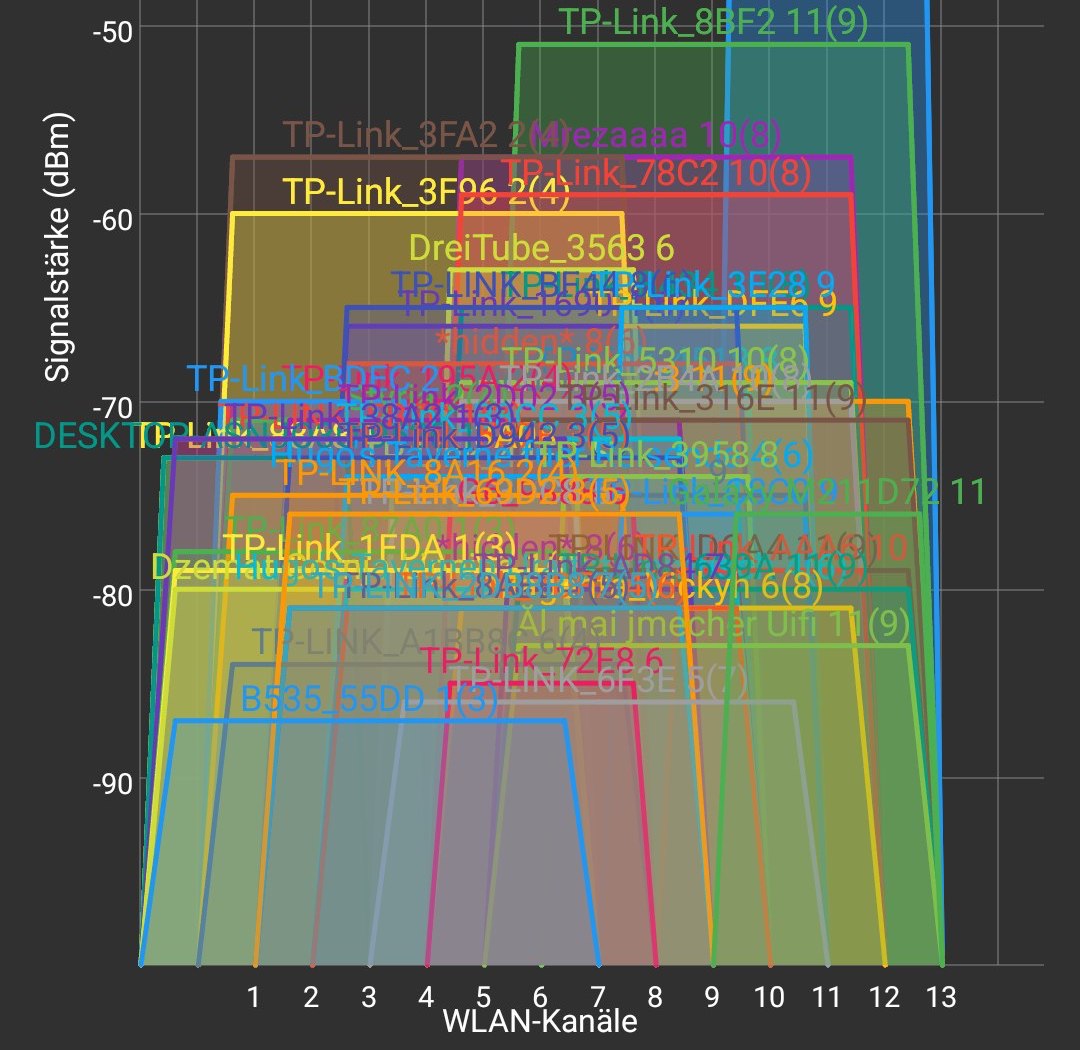
WiFi connections are often slower due to signal interference. In a building like our campus, with many rooms and many residents, there are hundreds if not thousands of WiFi networks all trying to use the same limited radio frequencies. Imagine 40 people trying to have phone conversations using only 13 working phone lines.
How does it look visually:
What causes interference?
- Too many networks: most routers operate on the 2.4 GHz frequency band, which only has 11-13 channels available. When dozens of routers nearby all use the same channels, their signals overlap and interfere with each other.
- Overlapping channels: even routers on "different" channels can interfere because WiFi channels are actually quite wide. Channels 1, 6, and 11 are the only non-overlapping channels in the 2.4 GHz band.
The result: your WiFi signal has to compete with all this interference, causing slow speeds, connection drops, and high latency.
Why wired connections are generally better?
- Foremost important: no interference.
- Higher speeds.
- Lower latency.
What if i really need WiFi?
We understand that some situations require WiFi (for example, if you only have a smartphone or tablet). However, if your current router's WiFi is too slow and you've tried everything else, here is your only option:
Upgrade to a better router.
If you absolutely need faster WiFi, you'll need to purchase a better, more modern router that supports:
- WiFi 5 (802.11ac) or WiFi 6 (802.11ax): these newer WiFi standards offer better performance with the cost of the range.
Important: the TP-Link router we offer is a budget model that only supports 2.4 GHz WiFi. It cannot be upgraded through settings or firmware updates. If you need better WiFi performance, you will need to purchase your own router.